
 fps.ms Team
 If you would like to update your Terraria servers, you can follow this article, which guides you step-by-step on updating your server.
Step-by-step process
- Stop the Server and Archive the "Saves"-folder
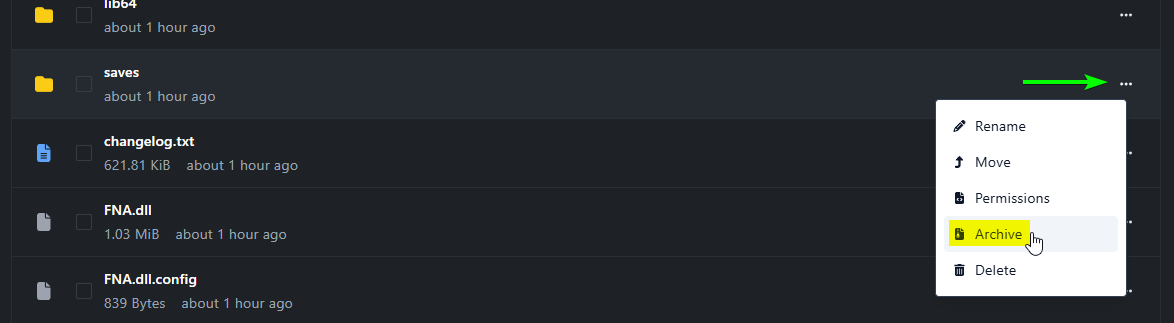
Do not skip this step! You will lose all your progress!
- Save the Archive created: this is a back-up of your world(s).
- Delete all the Files (including your Worlds, as you have them downloaded and backed up in your computer by this point)
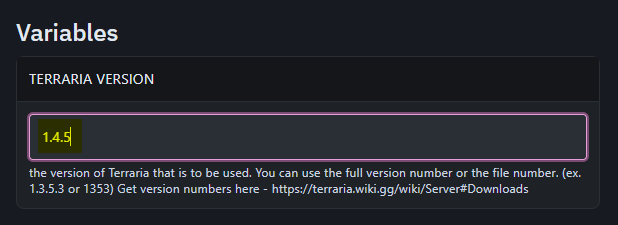
- Go to the Startup-tab
- Set "Version" to the version you would like to have (such as 1.4.5)
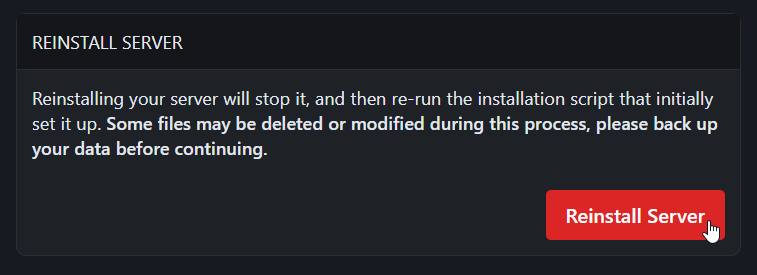
- Press "Reinstall" in the Settings-tab and wait for the server to be reinstalled with the newer version
- Re-upload your Saves-folder and Start your server. Your server is now updated.