
 fps.ms Team
 If you no longer need your free server, you can delete it at any time through the server renewal panel.
How to Delete Your Free Server
- Navigate to your server's console
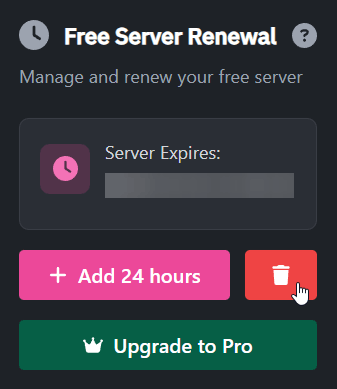
- Locate the Free Server Renewal box
- Click the Delete Server button (trash can icon) next to the renewal button (see image)
What Should I Know Before Deleting?
- This action is permanent - Once deleted, your server and all its data cannot be recovered
- No refunds - Free servers do not have any associated payments, so there's nothing to refund
- Immediate effect - The server will be removed immediately after confirmation
What Should I Do Before Deleting?
Consider the following before deleting your free server:- Download your files - Use the File Manager to download any important files or worlds
- Export databases - If you have databases, export them before deletion
- Note your configurations - Save any custom startup parameters or settings you may want to reuse